



2: Main Header of BIMeta
41 views · updated 14 hours ago

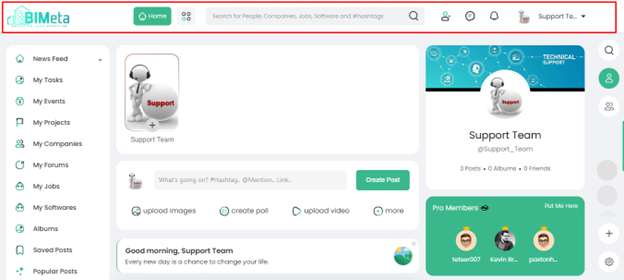
Here's
a quick guide to help you navigate the site header easily:
- Logo:In the top left corner, you'll find our logo. Give it a click, and the site will refresh, and your posts will magically appear on the page.
- Home Button:Look for the vibrant green "Home" button. Clicking on it will whisk you away to the main home page, where all the action happens.
- Create Button:Right next to the "Home" button, you'll spot the "Create" button. Feel free to click on it to start creating the events.
- Search Field:In the middle of the header, there's a search field. Use it to find companies, jobs, people, software, or explore trending #hashtags. It's your gateway to discovering what matters most to you.
- Icons on the Left:
- Request Icon:Connect with others easily by checking your friend requests here.
- Message Icon:Click to dive into your messages and stay in touch with friends.
- Notifications Icon:Stay in the loop with what's happening – all your notifications in one place.
- Profile Icon:Your personal space! Manage your account, settings, and everything about you.
Was this article helpful?
Share