



2.6: Profile Icon
33 views · updated 14 hours ago

Explore your profile on
BIMeta with this simple guide:
- Profile Icon:
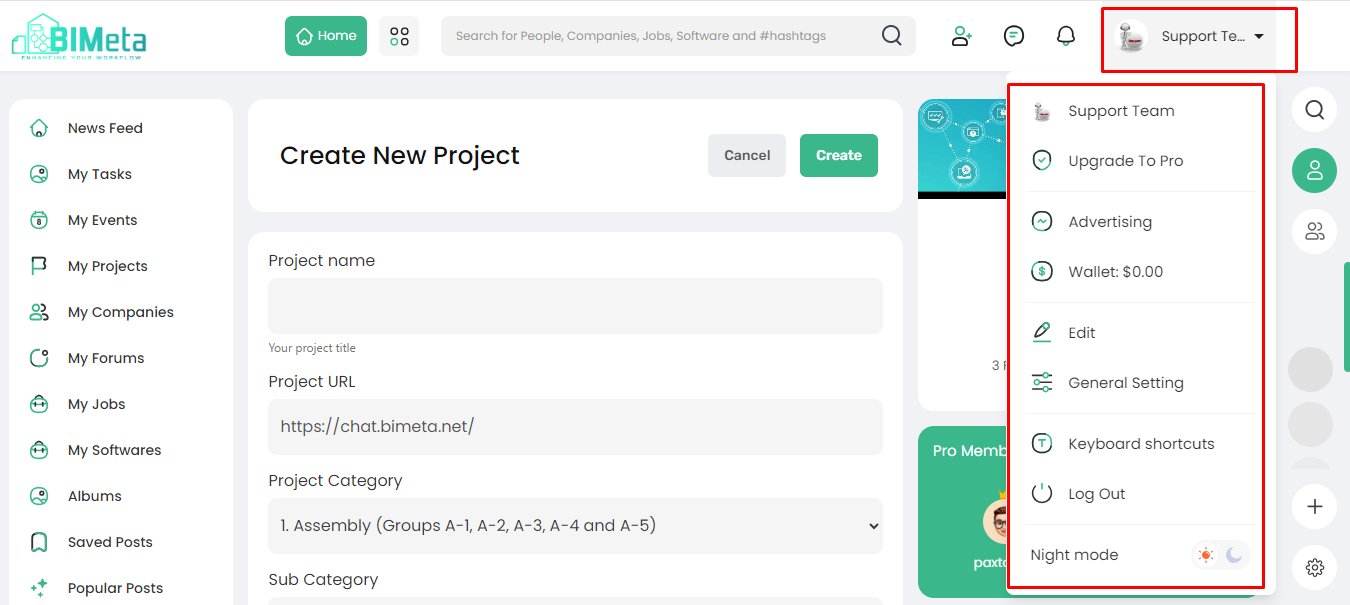
- Find your profile icon on the top right corner of the main header, displaying your logged-in name.
2. Click to Access:
- Click on the profile icon to open up a world of options just for you!
3. Options Available:
- Support Team: Need help? Connect with our support team.
- Upgrade to Pro: Unlock premium features with a Pro upgrade.
- Advertising: Explore advertising opportunities.
- Wallet Balance: Keep an eye on your BIMeta wallet.
- Edit: Make changes to your profile details.
- General Settings: Customize your BIMeta experience.
- Keyboard Shortcut: Optimize your navigation with shortcuts.
- Log Out: Safely exit your BIMeta session.
- Night Mode: Switch to a soothing night mode for comfortable browsing.
Now you're all set to
navigate your BIMeta profile with ease, each section detail will
describe in the below sections.
Was this article helpful?
Share