



2.2.4: Create Event
32 views · updated 12 hours ago

Planning an event on BIMeta,
Awesome! Here's a quick guide for the "Create Event" tab:
1. Click
"Create Event":
- Find the "Create Event" tab and give it a click. Get ready to make your event shine!
2. New
Page Opens:
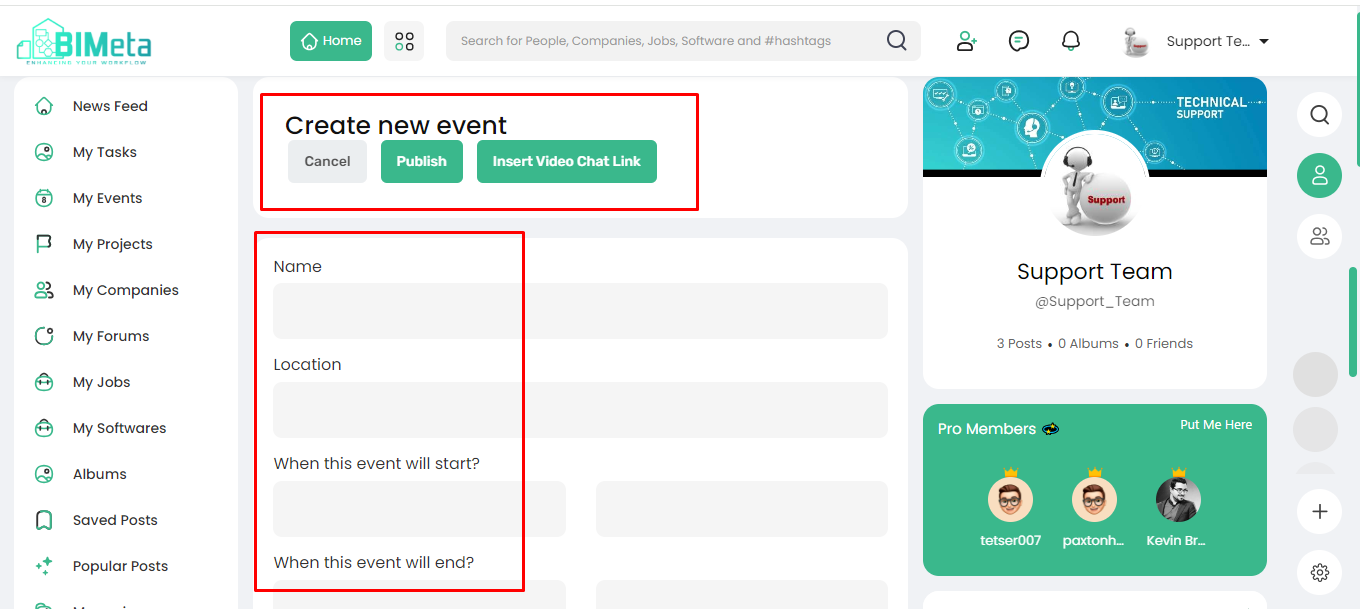
· A
new page pops up with:
- Cancel: Change your mind? Hit
cancel.
- Publish: Ready to share? Hit publish.
· Insert
Video Chat Link: Make your event virtual with a video chat link.
3. Event
Details:
- Fill in the event details:
- Name: Give your event a catchy name.
- Location: Where is it happening?
- Start and End Time: Set the time frame.
- Description: Share what your event is all about.
- Image: Add an eye-catching picture.
4. Spread
the Word:
Use
this feature to create and manage events. Whether it's a get-together or
an upcoming happening, BIMeta got you covered. Hit publish, spread
the word, and get everyone on board for your fantastic event!
Was this article helpful?
Share