



2.2.3: Create Blog
39 views · updated 12 hours ago

Here's a quick guide for the
"Create Blog" event:
1. Click
"Create Blog":
- Find the "Create Blog" event tab and give it a click. Get ready to express yourself through words!
2. Article
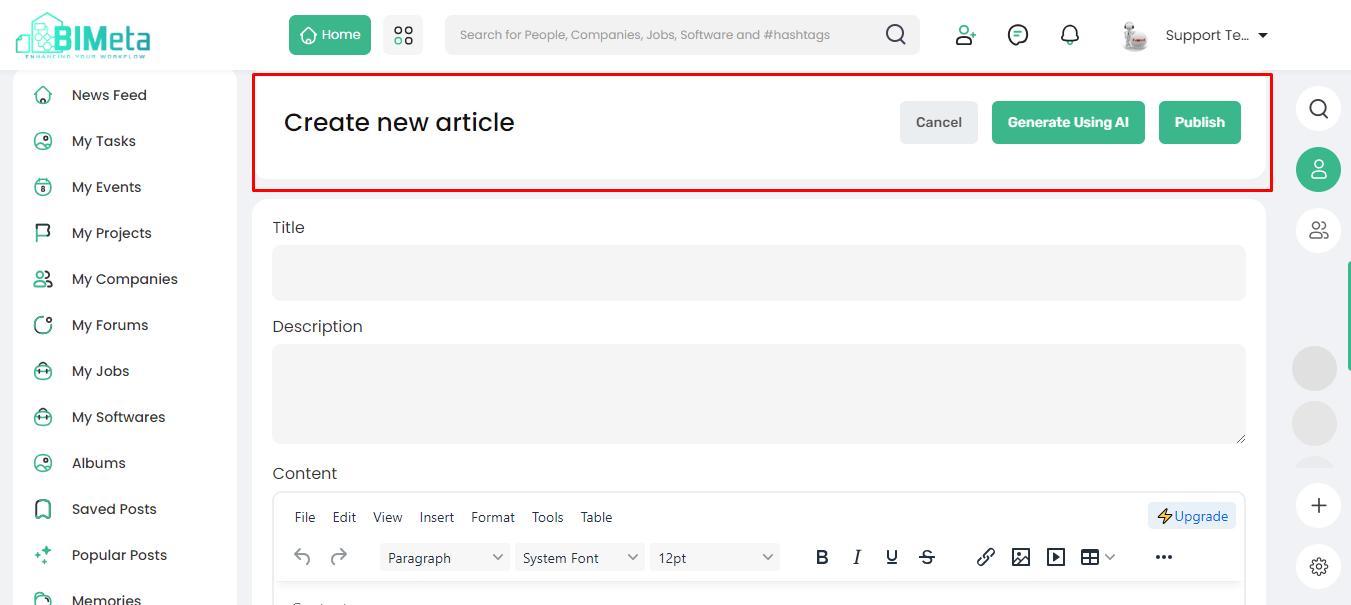
Content Page:
· A
new page opens with the "Article Content" section. Here,
you'll find:
- Cancel: Change your mind? Hit cancel.
- Generating using AI: Need inspiration? Let AI assist you.
- Publish: Ready to share? Hit publish!
3. Fill
in Details:
· Complete
the details on the page:
- Title: Give your blog a
catchy title.
- Description: Briefly describe what
your blog is about.
- Content: Pour your thoughts into the writing space.
· Thumbnails: Add
an eye-catching image.
4. Bottom
of the Page:
· At
the bottom, find:
- Category Drop Down: Choose where your blog
fits.
- Tag Options: Add relevant tags.
Express yourself, share your thoughts, and engage with the community through writing. Creating a blog on BIMeta is as simple as that.
Was this article helpful?
Share